When people first hear terms like serverless, Fargate, Lambda, API Gateway, ECR, ECS and Jenkins, it can all feel like a lot of moving parts with no obvious place to begin. recentlyy, that was exactly the challenge I wanted to work through: not just understanding each service in isolation, but seeing how they fit together as part of one working application. In this post, I’ll explain how I turned a simple user story into a full serverless CI/CD pipeline on AWS
The user story was simple:
As a user, I want to visit a website, click a button, and receive a weather response generated by a serverless backend.
That small story turned out to be a really useful anchor. It gave me something concrete to build, test and reason about. The result was a cloud-native application with a Flask frontend running on Amazon ECS Fargate, a backend function running on AWS Lambda, Amazon API Gateway sitting in front of the Lambda, and Jenkins automating the full CI/CD process from GitHub.
This post walks through the project from the ground up, explaining how the system was designed, what problems appeared along the way, and how the final solution came together.
Starting with the application itself
Before any cloud infrastructure was involved, I needed something worth deploying. I chose a small Flask application as the frontend because it was simple enough to move quickly with, but still realistic enough to demonstrate routing, templates, JSON responses and backend integration.
The frontend had two responsibilities. The first was a lightweight quote endpoint, handled entirely within Flask. The second was a weather feature which would eventually call a serverless backend.
That distinction mattered. The quote route was handled locally in the Flask application. A browser could request /quote, Flask would select a quote from a list, and return it immediately. The weather feature, however, was different. In that case, the browser would call a Flask route called /invoke-lambda, and Flask would then forward the request to an API Gateway endpoint, which would trigger a Lambda function and return the result back to the frontend.
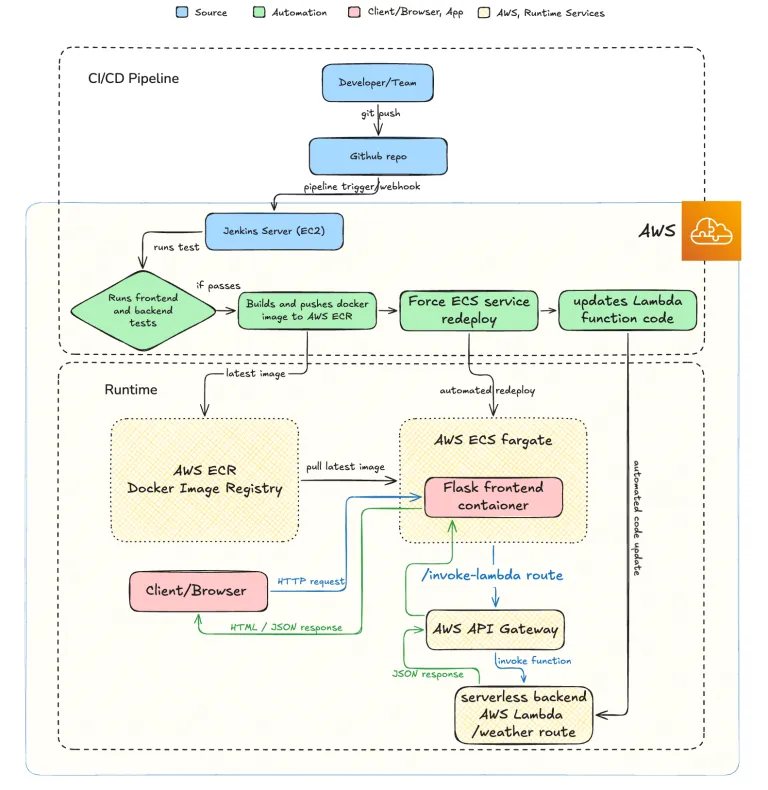
That meant the runtime flow looked like this: Client or browser sends a request to the Flask frontend. Flask either handles the request directly, as in the quote feature, or forwards the request to API Gateway, which then invokes Lambda and returns a JSON response back through Flask to the browser.
At that point, I already had an important architectural decision in place. The client was not talking to Lambda directly. The Flask container was acting as the entry point for the user-facing application.
Designing the serverless backend
The Lambda function itself was intentionally small. It did not need a database or any complex dependencies. Its purpose was simply to accept a city from query string parameters and return a weather message.
I used a small in-memory dictionary of cities such as London, New York, Tokyo, Sydney and Paris. If the requested city existed, the function returned a 200 response with a message string. If not, it returned a 400 response telling the user which cities were available.
The value of building the backend this way was not realism in the data. It was realism in the architecture. Even though the weather itself was static, the system behaved like a real serverless backend: API Gateway accepted the HTTP request, Lambda processed it, and the response came back as JSON.
Before even touching AWS, I tested the Lambda logic locally using Python unit tests. That gave me confidence that the function behaved properly for both valid and invalid inputs. It also exposed one of the first practical issues I hit: Python import paths in the backend test folder. Because the test file lived under backend/tests, pytest could not find lambda_function.py automatically. The fix was to add the parent directory to sys.path in the test file so the Lambda module could be imported correctly.
That may seem like a small detail, but it was a good reminder that even simple projects need structure.
Restructuring the project for the architecture
Originally, the project began as more of a single Flask app. As the architecture became clearer, I reorganised the repository into two main folders: one for the frontend and one for the backend.
The frontend folder contained the Flask application, templates, Dockerfile, start script and tests. The backend folder contained the Lambda function and its tests. At the repository root, I kept the Jenkinsfile, README and CloudFormation template.
That structure was important because it aligned the codebase with the actual deployment model. The frontend would be built into a Docker image and run on ECS Fargate. The backend would be packaged and deployed as a Lambda function. Jenkins needed to understand both halves separately, and the repository needed to communicate that clearly.
Building the frontend experience
The frontend weather page became a small JavaScript-driven demo. I originally considered removing JavaScript altogether to keep the application entirely Python-driven, but once I looked at the UI I had already built, it became clear that the JavaScript approach fitted the interaction model much better.
The page allowed the user to select a city and click a button. The browser then sent a JSON POST request to the Flask route /invoke-lambda. Flask looked up the LAMBDA_WEATHER_URL from the environment, built the API Gateway request, called it using Python, and returned the resulting JSON back to the frontend.
This turned out to be a really useful middle ground. The application still had a user-friendly dynamic page, but the browser itself was not directly calling API Gateway. That meant the frontend container retained control of the server-side flow, which matched the architecture I wanted to demonstrate.
Once the frontend worked locally, the next challenge was packaging it.
Containerising the frontend
Because the frontend was going to run on Amazon ECS Fargate, it needed to be containerised. I wrote a Dockerfile based on python:3.11-slim, copied the requirements file, installed dependencies, copied the application code, exposed port 5000 and used a start script to launch the app.
One subtle issue here came from building the image on macOS. Since ECS Fargate runs Linux containers, I built the image using --platform linux/amd64 to avoid architecture mismatches, especially important on Apple Silicon Macs. That gave me a container image aligned with the runtime environment in AWS.
Testing the Docker image locally was an important checkpoint. If the application could not run correctly in Docker on my machine, there was no point moving ahead to ECR or ECS. Once it worked locally, I knew the container itself was sound.
Introducing ECR, ECS and Fargate
With a working image, the next step was getting it into AWS.
Amazon ECR was used as the image registry. I created a private repository, tagged the local image with the ECR URI, authenticated Docker to ECR using AWS CLI, and pushed the image.
From there, I created an ECS cluster, a task definition describing the container, and an ECS service to keep the task running. Since the Flask app ran on port 5000, the task definition needed to reflect that. I initially deployed without a load balancer, using a public IP for testing, which kept the setup simple.
That part of the project was a useful lesson in separation of concerns. Pushing an image to ECR does not deploy it. ECR stores it. ECS pulls it. The task definition tells ECS how to run it. The service ensures it stays running. Each service has a distinct role, and the deployment only made sense once those roles were clear in my head.
One more detail became important at this stage: environment variables. Locally, I could export LAMBDA_WEATHER_URL before running Flask. But the deployed frontend would not magically know that API Gateway URL unless I explicitly added it to the ECS task definition. So I created a new task definition revision with LAMBDA_WEATHER_URL set to the API Gateway weather endpoint, updated the ECS service to use the new revision, and only then did the deployed frontend gain the ability to call the backend successfully.
That was one of the most satisfying moments of the project. The weather button worked not only on my laptop, but from the deployed ECS application as well.
Creating the serverless backend in AWS
On the backend side, I created the Lambda function through the AWS Console, pasted in the weather code, deployed it and tested it using a sample test event. The first time I ran the Lambda test, I got the default “Hello from Lambda!” response because I had forgotten that updating the code editor alone is not enough: Lambda requires you to click Deploy after code changes. Once that was done, the correct weather response appeared.
After that, I created an HTTP API in API Gateway, added the Lambda as the integration, configured a GET /weather route, and tested it directly using curl. Seeing the endpoint respond with the expected weather message was the proof that the serverless backend itself was working independently of the frontend.
CORS was also configured in API Gateway, although in this architecture it was not the critical factor because Flask was making the backend request server-to-server. Still, it was part of the required setup and useful for future flexibility.
At this stage, the application as a whole was working. But the CI/CD part was still missing.
Moving from manual deployment to Jenkins automation
The next phase of the project was setting up Jenkins on an EC2 instance. I used a CloudFormation template to spin up the infrastructure, created an EC2 key pair, SSH’d into the server, confirmed Jenkins was running, unlocked it, installed the suggested plugins and created an admin user.
Then I connected Jenkins to the GitHub repository and created a Pipeline job based on the Jenkinsfile stored in source control.
The pipeline did not begin as a full deployment pipeline. It was built incrementally. First, it only checked Python, installed dependencies, ran frontend and backend tests, and built the frontend Docker image. That first successful pipeline run was already a major milestone because it proved Jenkins could reach the repo, run the tests and build the app.
One of the first issues I hit in Jenkins was that pytest was installed, but the pytest command itself was not available on the shell path for the Jenkins user. The fix was simple but instructive: instead of running pytest, I ran python3 -m pytest, which avoided the PATH issue entirely.
Once the test and build stages worked, I added an AWS identity check using aws sts get-caller-identity. That confirmed the EC2 instance role was working. From there, I added the ECR login, image tagging and image push stages. Then I added the ECS redeployment stage using aws ecs update-service --force-new-deployment.
At that point, I effectively had CI/CD for the frontend.
Completing the full CI/CD cycle with Lambda deployment
The final missing piece was backend deployment automation. Up until that point, Lambda changes still required a manual deployment through the AWS Console. That meant the project had CI/CD for the frontend but not for the whole application.
To fix that, I added a Lambda deployment stage to the Jenkins pipeline. Jenkins zipped backend/lambda_function.py and called aws lambda update-function-code. The first time I tried this, the pipeline failed with an AccessDeniedException. The EC2 role had permissions for ECR and ECS, but not for updating Lambda code.
The resolution was to attach Lambda permissions to the Jenkins EC2 role. Once that IAM change propagated, the pipeline succeeded.
That final success meant the pipeline now handled everything: frontend tests, backend tests, frontend image build, ECR push, Lambda deployment and ECS redeployment. The application had moved from manually deployed pieces to a genuinely automated pipeline.
What the finished system looked like
By the end, the system had a clean and understandable flow.
The live application path was:
A client browser sends a request to the Flask frontend container running on ECS Fargate. If the user asks for a quote, Flask handles it directly. If the user uses the weather feature, Flask calls API Gateway through its
/invoke-lambdaroute, API Gateway invokes Lambda, and the weather response is returned back through Flask to the browser.
The CI/CD path was:
A developer pushes code to GitHub. Jenkins pulls the latest changes, runs frontend and backend tests, builds the frontend Docker image, pushes it to Amazon ECR, updates the Lambda function code, and forces an ECS service redeployment so the latest frontend is pulled into Fargate.
That is what made the project feel complete. The moving parts were not just sitting next to each other; they were working together.
What I learned from the project
One of the biggest lessons from this project was that cloud architecture becomes much less intimidating when tied to a concrete user story. Instead of thinking abstractly about “serverless” or “containers”, I could ask a very specific question: what happens when a user clicks the weather button?
That one question leads naturally to everything else. How does the request reach the backend? Where does the frontend run? Where is the image stored? How does the latest code get deployed? What happens when code changes?
Another useful lesson was that CI/CD is best built incrementally. Trying to automate everything at once would have made debugging much harder. Building the pipeline in small stages, tests first, then image build, then ECR push, then ECS redeploy, then Lambda deployment meant that each new failure was isolated and understandable.
Finally, the project reinforced that “serverless” does not mean there are no servers. It means I do not manage the underlying backend servers myself. AWS runs the Lambda execution environment for me. In this project, the system was actually a hybrid of container-based and serverless architecture: a containerised frontend with a serverless backend.
Closing thoughts
This project started with a very simple idea: let a user click a button and get a weather response. But following that small user story all the way through forced me to work across application development, containerisation, AWS infrastructure, runtime configuration, IAM permissions, and CI/CD automation.
By the end, I had not only built a working application, but also a deployment process that felt like something much closer to real-world DevOps practice. The frontend ran on ECS Fargate. The backend ran on Lambda behind API Gateway. Jenkins sat in the middle as the automation engine tying GitHub, ECR, ECS and Lambda together.
What I liked most about the journey was that each service stopped feeling like an isolated AWS acronym and started becoming part of a coherent story. That, to me, is when cloud learning becomes genuinely valuable: when the pieces stop being abstract and start becoming a system you can explain, troubleshoot and improve.
Project Diagram